
Your
DIGITAL
INSIDER
TN Environments
TN Environments is a WordPress plugin designed to make it immediately obvious which environment a user is working in—development, staging, or production.
The plugin prompts users to confirm the environment at login, applies environment-specific styling throughout the WordPress admin, and provides clear visual cues to reduce the risk of making changes in the wrong place. In multisite installations, it operates network-wide to deliver a consistent experience across all sites.
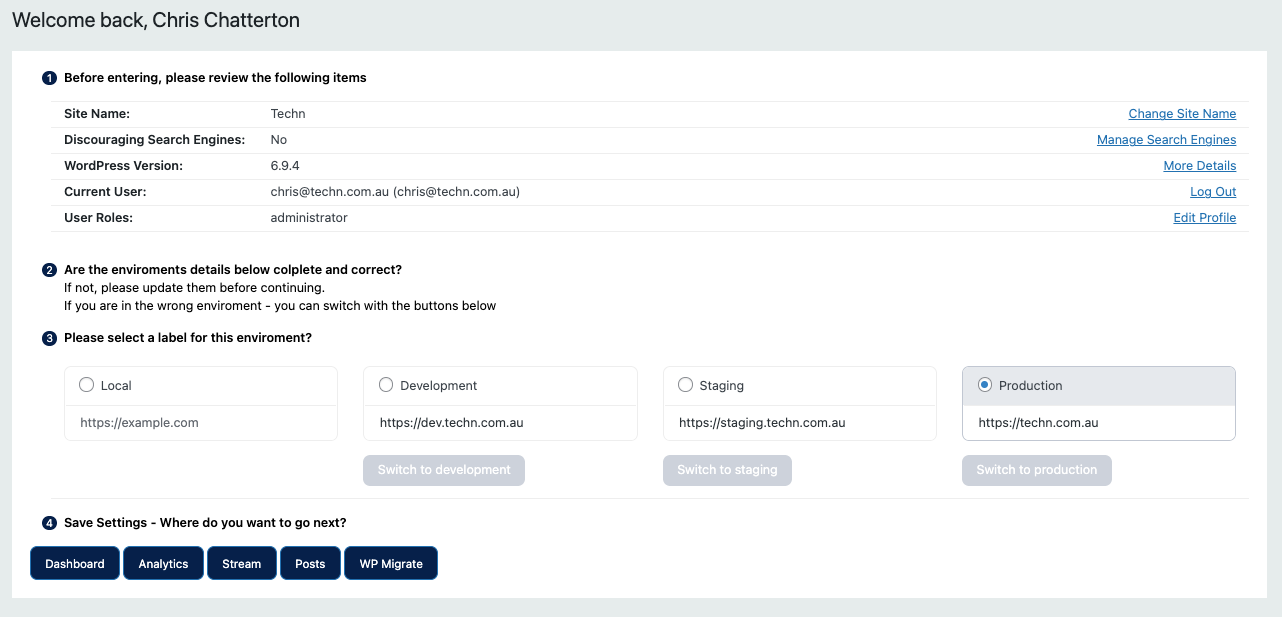

Core features include environment selection and confirmation, admin body classes for environment-specific styling, login redirection rules, environment summaries and switching, build identifiers, Stream integration, and the ability to hide admin menus until the environment is confirmed.
The philosophy behind the plugin is simple: mistakes in WordPress are often not capability problems—they are context problems.
Most users already have the permissions they need. The real challenge is knowing whether they are working in production, staging, or development at any given moment. TN Environments focuses on improving awareness and reducing human error through clear UX rather than adding more governance or process.
For most organisations, that is more than enough. A simple visual reminder and environment-aware experience can prevent accidental changes, improve confidence, and make working across multiple WordPress environments significantly safer.
# Changelog
All notable changes to TN Environments are recorded here.
## 1.10.2 - 2026-09-26
- Lower the PHP requirement to 7.4, matching WordPress 7.0.
- Allow the PHP 7.4-compatible TN Update Controller bootstrap.
## 1.10.1 - 2026-09-26
- Process environment saves before admin output so destination redirects work on WordPress 7; explicitly check save authority.
- Require WordPress 7.0+ and PHP 8.5+ for this release.
- Replace the independent GitHub updater with the version 1 TN Update Controller integration.
- Add local Install/Activate/Check controller actions and standardise Techn author/repository metadata.
- Preserve plugin identity, feature code, settings and activation scope; no feature-plugin release discovery runs during page rendering.
## 1.10 - 2026-09-04
- Added a white background and padding to the environment tabs panel.
- Added a nonce-protected "Check for updates" action and result notices to the Plugins screen.
- Updated GitHub release discovery to use the repository manifest and public redirect before the API fallback.
- Aligned update caching, failure backoff, metadata, licensing, and WordPress readme files with the current GitHub updater standard.
## 1.9 - 2026-06-14
- Renamed the plugin package from `tn-enviroments` to `tn-environments`.
- Added compliant plugin metadata, version constant, and GitHub repository links.
- Added GitHub release update support for native WordPress plugin updates.
- Added stale update cleanup and forced update-check cache bypass handling.
- Added root `tn-environments.zip` direct upload package and release build script.
- Improved request sanitisation, escaping, activation hooks, and settings-page asset loading.
## 1.8 - 2026-01-10
- Added Build ID function.
## 1.7 - 2025-12-31
- Removed Activity Feed, linked to Stream if available, and fixed CSS.
## 1.6 - 2025-03-15
- Fixed CSS.
## 1.5 - 2024-01-11
- Extended UX/UI with summary, URLs, switching, and instructions.
## 1.4 - 2024-12-31
- Added "what you've missed" from Stream.
## 1.3 - 2024-11-01
- Added support for local environment with custom styles.
## 1.2 - 2024-10-01
- Redirected users based on environment.
## 1.1 - 2024-09-01
- Hid admin menus until logged in.
## 1.0 - 2024-01-01
- Initial plugin release.